📋 Copy a cURL command from your browser
CURL cURL-to-code converter user guide
CURLThe cURL-to-code converter is an essential online tool for developers, quickly turning cURL commands into HTTP request code in many programming languages. It runs entirely in your browser and never uploads any data to a server, keeping your privacy safe。
Key features
🔄 Smart cURL parsing
Automatically detect each part of a cURL command
- HTTPMethod detection (GET, POST, PUT, DELETE, etc.))
- URLExtraction and parameter parsing
- Automatic header detection
- Smart request body format detection
- Extract authentication
🌐 Multi-language support
Supports popular programming languages and HTTP libraries
- JavaScript: fetch, axios, jQuery
- Python: requests, http.client
- Java: HttpClient, OkHttp
- PHP: cURL, Guzzle
- Go: net/http
- C#: HttpClient
- Ruby: Net::HTTP
- Shell: wget
⚡ Real-time conversion
Convert your cURL command to code with one click
- Parse cURL commands instantly
- Quickly generate target code
- Syntax highlighting
- Copy to clipboard with one click
- Code export support
🔒 Fully private
All processing happens locally in your browser
- No data is uploaded to any server
- No activity logs are recorded
- No sensitive information is stored
- Open source, transparent, and auditable
- Safe, reliable, and trustworthy
📚 Quick example
Includes cURL examples for common scenarios
- Basic GET/POST request
- JSONData submission
- Bearer TokenAuthentication
- Basic AuthAuthentication
- API KeyAuthentication
- Custom headers
🎯 Best practices
Generate code that follows best practices
- Add error handling logic
- Uses recommended libraries and methods
- Adds the necessary code comments
- Code formatting
- Readable and maintainable
How to use
Enter a cURL command
Paste or type a cURL command in the left editor; copying directly from browser DevTools is supported
Select target language
Choose the target programming language and HTTP library from the dropdown at the top; 8 popular languages are supported
One-click convert and copy
Click"Convert" to generate code. The generated code appears on the right and can be copied with one click.
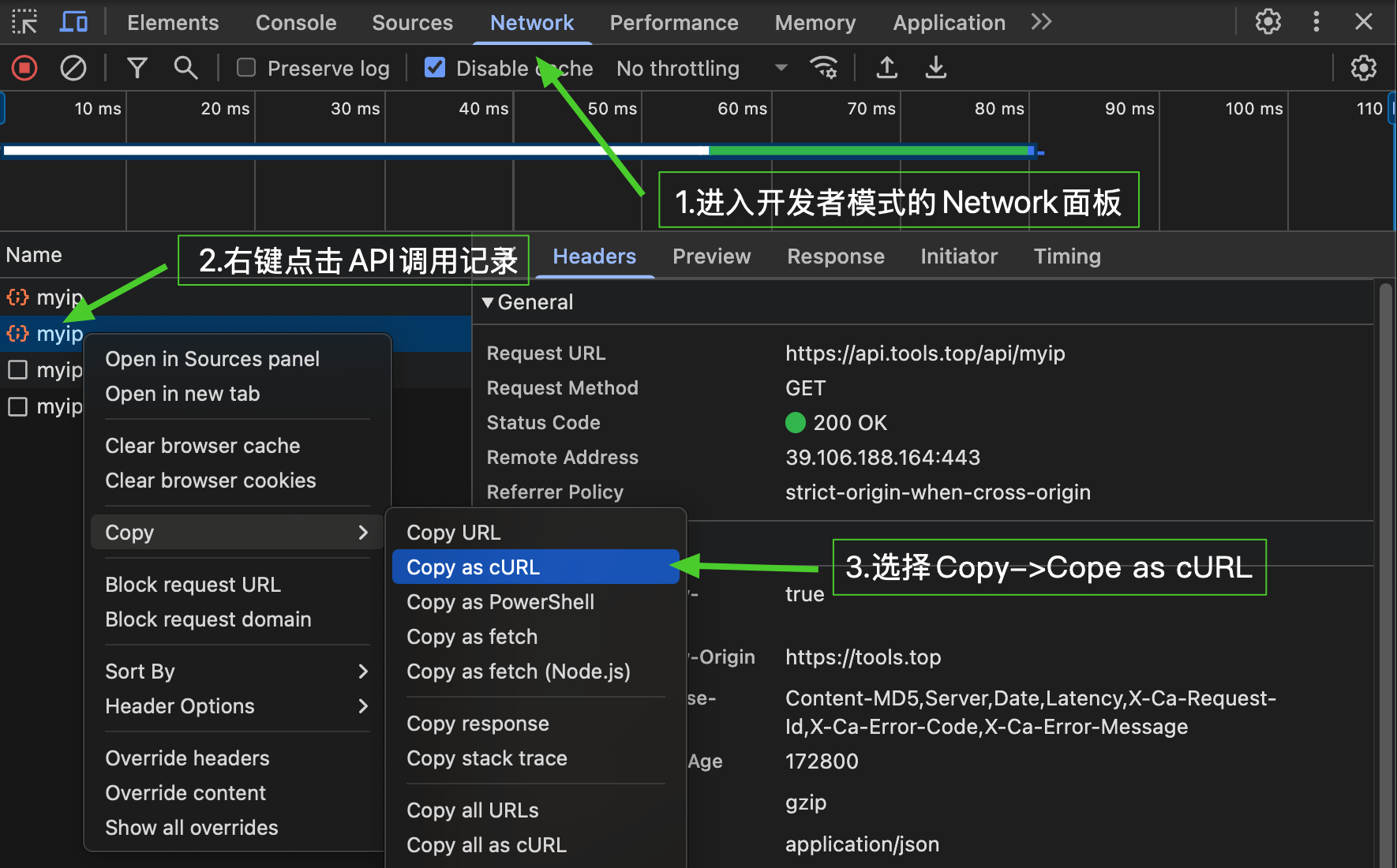
Copy a cURL command from your browser
Chrome / Edge / Brave
- Open developer tools(F12 or Cmd+Option+I)
- Switch to
Networktab - Run the network request you want to copy
- Find the target request in the request list and right-click it
- Select
Copy→Copy as cURL(bash) - Paste it into the editor on the left
Firefox
- Open developer tools(F12)
- Switch to
networktab - Run the network request you want to copy
- Right-click the target request in the request list
- Select
Copy→Copy as cURL - Paste it into the editor on the left
Safari
- Enable the Develop menu (Preferences → Advanced → Show Develop menu)
- Open developer tools(Cmd+Option+I)
- Switch to
networktab - Run the network request you want to copy
- Right-click the target request,Select
Copy as cURL - Paste it into the editor on the left
⚠️ Privacy notice
cURL commands copied from browser DevTools may contain sensitive information (such as Cookie, Token, API Key, etc.), so protect your privacy and do not share them with others. All processing in this tool happens locally and no data is ever uploaded。
CURL Command basics
cURL (Client URL) is a command-line file transfer tool that works with URL syntax and supports many protocols (HTTP, HTTPS, FTP, etc.). In web development and API debugging, cURL is one of the most widely used command-line tools。
Common cURL options explained
-X, --request <method>
Specify the HTTP request method (GET, POST, PUT, DELETE, PATCH, etc.))
curl -X POST https://api.example.com/users
-H, --header <header>
Add custom HTTP headers; use repeatedly to add multiple headers
curl -H "Content-Type: application/json" -H "Authorization: Bearer token" https://api.example.com
-d, --data <data>
Send POST data; Content-Type is automatically set to application/x-www-form-urlencoded
curl -d "name=John&age=30" https://api.example.com/users
-u, --user <user:password>
HTTPBasic authentication with username and password
curl -u username:password https://api.example.com/protected
-i, --include
Include HTTP response headers in the output
curl -i https://api.example.com/users
-v, --verbose
Output detailed request and response information for debugging
curl -v https://api.example.com/users
-k, --insecure
Skip SSL certificate verification, for test environments (not recommended in production))
curl -k https://self-signed.example.com
Common use cases
Send a GET request
curl -X GET "https://api.example.com/users?page=1&limit=10"
Send JSON data
curl -X POST "https://api.example.com/users" \
  -H "Content-Type: application/json" \
  -d '{"name":"John","email":"[email protected]"}'
Bearer TokenAuthentication
curl -X GET "https://api.example.com/profile" \
  -H "Authorization: Bearer your_token_here"
File upload
curl -X POST "https://api.example.com/upload" \
  -F "file=@/path/to/file.pdf"
Why convert to code?
- Integrate into project:Turn API debugging commands into project code to complete API integration quickly
- Automated testing:Turn manually tested cURL commands into automated test code
- Learning reference:Learn how HTTP requests are implemented across different programming languages
- Cross-platform development:Port a request from one platform to another quickly
- Team collaboration:Standardize your team’s API call patterns and code style